Castle Mobile – Browser Play, Deposits & Support on Any Device
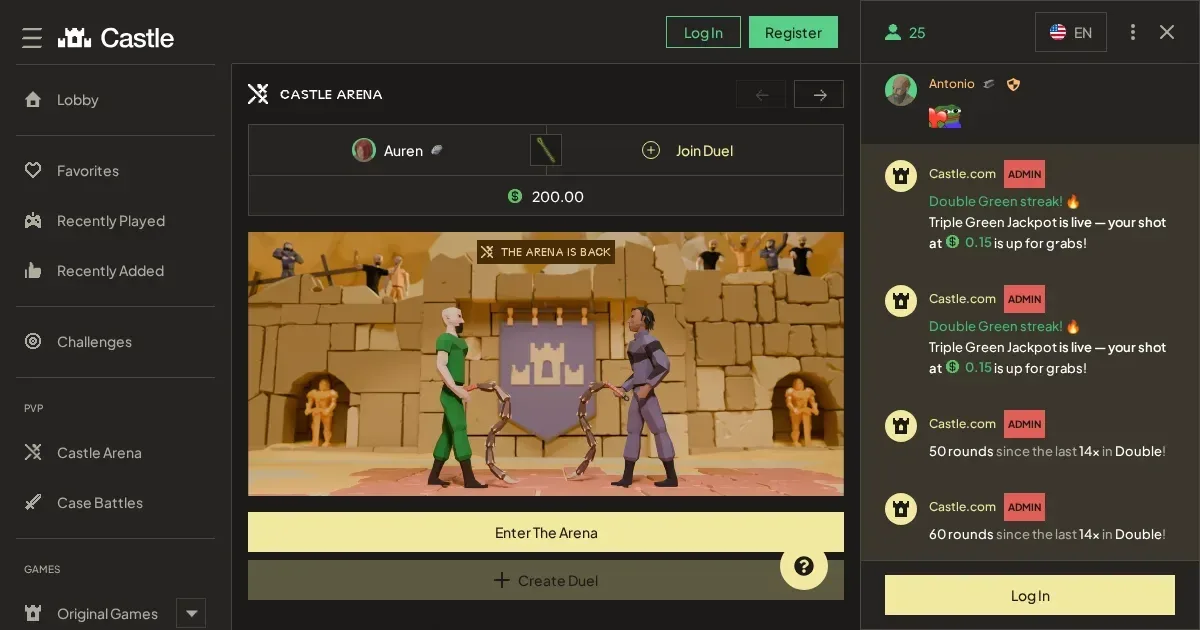















Castle runs entirely in your phone's browser, with no native app required. You log in through the same address you use on desktop, and your account works across both. The games library, cashier and support channels are all accessible from a mobile screen.
The site lists over a dozen game categories—slots, live casino, Plinko, Dice, Crash, Mines—and each one loads in Safari, Chrome or your default browser. You deposit and withdraw using the same methods as desktop, and verification documents can be uploaded from your camera roll.
Getting to Castle from a phone
There is no iOS or Android app to download. Access works through your browser, and the steps are identical to logging in from a laptop.
- Open your phone's browser and navigate to the Castle site address.
- Tap the login button at the top of the screen.
- Enter your username and password—the same credentials you use on desktop.
- Once logged in, your balance, game history and active bonuses appear exactly as they do on a larger screen.
If you don't have an account yet, the registration form is the same one the desktop site uses. You'll provide a verified email address, username, password, and—before depositing—your legal name, address, occupation and date of birth.
Your session stays open until you sign out manually. On a shared device, always log out before handing the phone to someone else.
What you can do from a mobile screen
The core functions—playing games, managing your balance, uploading documents and reaching support—are all present on mobile.
| Function | Available on mobile |
|---|---|
| Games | Full library: slots, live casino, crash games, Plinko, Dice, Mines, Blackjack, Keno |
| Deposits | Card, e-wallet, bank transfer, crypto—same methods as desktop |
| Withdrawals | Processed through the cashier; timing remains 2 banking days |
| Verification (KYC) | Upload ID, selfie and utility bill directly from your phone |
| Support | Email and live chat, same as desktop |
| Loyalty rewards | Daily, weekly and monthly claims; rank progress visible in settings |
Live dealer games render in portrait or landscape, and the chat window appears as an overlay. Slots and crash games scale to fit the screen width, with controls at the bottom. The cashier page lists your deposit and withdrawal history, and you can initiate a new transaction from there.
Verification documents can be uploaded from the settings menu. If step-two verification is triggered by deposit size or blockchain analytics, you'll receive a prompt to upload your government ID and a selfie. The AI scan works the same way it does on desktop, and you can photograph the documents with your phone's camera rather than scanning them.
The loyalty program on a small screen
Your rank progress—Wood, Bronze and beyond—appears in the settings tab. The daily, weekly and monthly claim buttons are positioned at the top of the loyalty page, and each one shows the percentage of rewards you can collect.
Rank-up bonuses are credited automatically when you cross a threshold. The 3,000 wagered requirement for Wood to Bronze is tracked in real time, and the milestone payment arrives the moment you qualify. Rakeboost windows and community cases are listed under the same menu.
What gets worse on a phone
Some tasks are more awkward on a small screen, even when the site is designed for mobile. Here's what tends to slow you down.
- Reading terms and conditions on a narrow display means scrolling through long blocks of text. The wagering rules, bonus restrictions and KYC policy each run to several pages, and pinching to zoom makes them harder to follow.
- Multi-table play in live casino is impractical. Desktop players open several windows at once; on mobile, switching between tables means backing out to the lobby each time.
- Entering long crypto wallet addresses on a touchscreen keyboard invites typos. Copy and paste from a secure notes app rather than typing manually.
- Verification uploads require good lighting and a steady hand. A blurry ID photo or a utility bill with one corner cropped out will be rejected, and you'll need to resubmit.
The live chat window covers part of the screen when it's open, so you may need to close it to see your balance or navigate the cashier. Email support avoids this, though it's slower.
Before you play from your phone
A few practical checks will save you trouble later, especially if you're playing away from home.
Connection: Use Wi-Fi where possible. Live dealer streams and crash games consume data quickly, and a weak mobile signal can drop your session mid-game. If the connection cuts out during a round, the operator's terms state that refunds are at their discretion.
Battery: Gaming sessions drain power faster than browsing. Keep a charger nearby or play with the phone plugged in to avoid losing a session at the wrong moment.
Verify the site address before logging in. Bookmark the correct URL the first time you visit, and always navigate from that bookmark rather than clicking a link in an email or a search result. Phishing sites often mimic the real domain with a single-character difference.
Set deposit limits before the session starts. Self-exclusion is available through the settings menu, and it puts your account into restricted mode—no depositing, no playing with money, no chat—for a 24-hour cool-down period. After that, you can extend the exclusion for one day, one week, one month, three months or indefinitely. If you select an indefinite extension, you must withdraw all funds first or you forfeit them.
Sign out on a shared device. If you hand your phone to someone else, always log out of your account first. Castle's terms prohibit account sharing, and leaving a session open on a device used by a minor risks a permanent ban.
Responsible play from a device you always carry
A phone is harder to walk away from than a laptop. It's in your pocket at work, on the train, in bed—anywhere you have a spare minute. That convenience makes it easier to play more often than you planned.
Here are a few signs that mobile play is getting out of hand:
- You're opening the site during meetings, meals or conversations.
- You've set a deposit limit and then logged in to increase it within the same session.
- You're playing to chase losses from earlier in the day.
- You're checking your balance or the live games lobby even when you don't intend to play.
If any of those sound familiar, self-exclusion is a better option than trying to moderate on willpower alone. The 24-hour cool-down is immediate, and it locks the cashier and the games until the period ends.
For free, confidential support, contact GamCare at www.gamcare.org.uk or call the National Gambling Helpline on 0808 8020 133 (24/7). BeGambleAware is at www.begambleaware.org, and GamStop (www.gamstop.co.uk) offers free national self-exclusion across all UK-licensed sites.
Blocking software can prevent you from reaching gambling sites even if you change your mind mid-session. Gamban (gamban.com) and BetBlocker (betblocker.org, free, multi-platform) both work on phones and tablets.
This site is for players aged 18 and over (18+). If gambling ever stops feeling like entertainment, free and confidential help is available at BeGambleAware.org.
Last updated:
Frequently asked questions
Does Castle have a native mobile app?
No. Castle runs entirely in your phone's browser, with no iOS or Android app to download. You log in through the same address you use on desktop, and your account works across both.
Can I deposit and withdraw from my phone?
Yes. The cashier is accessible from any mobile browser, and you can use the same payment methods as desktop—card, e-wallet, bank transfer and crypto. Withdrawals are processed within two banking days, and you can upload verification documents from your camera roll if required.
Do live dealer games work on a small screen?
Yes. Live casino games render in portrait or landscape, and the chat window appears as an overlay. The video stream scales to fit your screen width, though multi-table play is impractical on mobile—you'll need to back out to the lobby to switch between tables.
What happens if my connection drops during a game round?
The operator's terms state that refunds for connection problems, server disruptions or lag are at their discretion. Use Wi-Fi where possible, and avoid playing on a weak mobile signal if the session matters to you.
Game Providers